

sk_live_ key, change the name and logo, and deploy: you get a branded product on top of Agent37 without building the control plane or the agent UIs yourself.
Paste this into your coding agent
agent37-platform/starter-kit
The dashboard, ready to fork. Next.js and Supabase, deploys to Vercel. Clone it, add your keys, run
npm run setup, and rebrand. (Formerly the whitelabel repo; the URL still redirects.)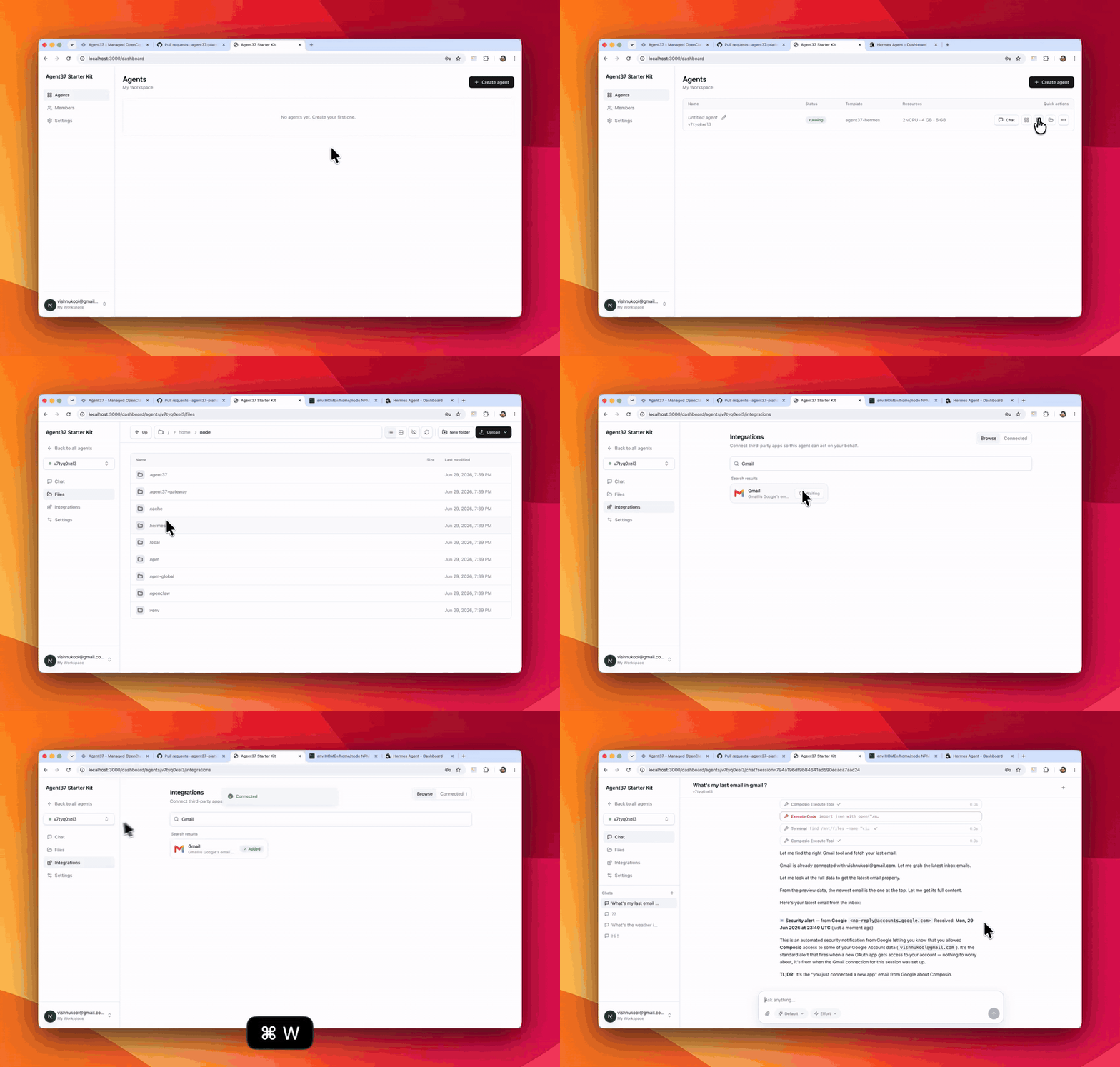
One app: a multi-tenant fleet dashboard, plus each agent's own Chat, Files, Messaging, Integrations, and Settings tabs.
What you get
- Multi-tenant from the start. Email-and-password sign-in through Supabase (open signup, no verification), with workspaces, team members, and invitations. Each agent is scoped to a workspace, and one user can belong to several.
- Full instance management. Create, start, stop, restart, resize, roll to a new image, and delete instances: every instance action wrapped in a UI, with per-agent budgets and usage.
- A native workspace per agent. Click an agent to open a tabbed workspace built right into the dashboard: Chat, Files, Messaging, Integrations, and Settings. Chat streams responses through the Agent API, and the file browser lists, reads, and writes the agent’s files through the Files API.
- One-click access to each agent’s own UIs. Alongside the native tabs, the dashboard mints signed URLs to open an instance’s built-in terminal, file browser, and dashboard in a new tab, so both styles of access ship out of the box.
- Messaging apps per agent. Your users connect their agent to Telegram (paste a BotFather token, the dashboard checks it and learns who owns the bot) and WhatsApp (scan a QR), then to Slack, Discord, and two dozen more from one generic credentials form. The channel list, the fields, and the live connection state all come from the agent itself, so a channel a later image adds shows up with no code change. See Messaging channels for the pattern.
- App integrations per agent. Connect Gmail, Slack, Notion, and more to each instance through the App integrations endpoints, so your users authorize their own accounts from your branded UI.
- Your choice of agent. The create screen offers a curated catalog (Hermes and OpenClaw on Agent37’s stock images) or your own image, built from the included scaffold.
- Your key stays server-side. Every Agent37 call goes through the app’s own backend (a BFF); the
sk_live_key is never exposed to the browser.
Get started
1
2
Clone it
3
Run setup
The fastest path is agent-driven: open the folder in Claude Code or Codex and paste the setup prompt from the README. It installs dependencies, asks for your two keys, provisions Supabase, and starts the app.To do it by hand, run
npm install, then npm run setup and paste your keys when prompted; it creates the Supabase project, runs the migration, and enables email auth.4
Run it
http://localhost:3000 and sign up with an email and password. The repo’s SETUP.md has the authoritative steps, a manual Supabase path, and the Vercel deploy guide.Make it yours
Rebranding is the point, and most of it is configuration:- Name and logo. Set
appNameandlogoUrlinsrc/config/branding.ts. Branding is code-side now, so it’s versioned with your fork (not env-driven). - Colors and theme. Tailwind, in the app’s styles.
- Your domain. Deploy to Vercel and point your domain at it.
AGENT37_API_KEY, the public Supabase variables, and the server-only SUPABASE_SERVICE_ROLE_KEY, and keep the setup-only secrets (the Supabase access token and database password) out of production. The repo’s SETUP.md lists exactly which variables to set where.
What it does and doesn’t do
The dashboard runs entirely on your Agent37 wallet and budgets: it sets a managed-spend cap per agent and shows usage, but it does not bill your end users. Payments are intentionally excluded, so add your own billing (the create route marks where an entitlement gate would go) when you charge them. It is a client of the Agent37 API, not a reimplementation of it: the chat and file tabs proxy the Agent API through the app’s backend, and everything the app can do is a subset of the public/v1 surface. The API, not this code, is the authority on what an agent can and cannot do.
Want to build the experience yourself instead of forking the dashboard? See Build a chat app for the integration pattern, or Build a custom image to change what the agent can do. Want the same app on your own Composio instead of managed integrations? See Use your own Composio.